It all starts with a brilliant sunrise. I sort of do like later sunrise times in the fall, if you have any clouds in the sky you are generally assured a glorious start to the day.
I drove down to Black Bottom Creek to see if I could catch the sunrise in the valley. See, there is an advantage to living in a hilly region. You can see the sunrise on the ridge, then drive down to the valley and see it again 15 to 20 minutes later.
It was my lucky day.
By the time I got back home it was chore time. After I was done with feeding my 4 hooved friends and the hounds, I spent some time with 'the girls' who had enjoyed our latest rains by rolling in the mud.
Morris has informed me that he would like to go on an adventure in the woods tomorrow. The temps are supposed to be in the 70's!
I've had this camera now for about 2 months.
I believe that I've shot a bit more than 1,600 photos with it so far.
Do I like it? You better believe I like it!
I love the panoramic feature for more than one reason. Sometimes there is just such a great sky and scenery that this just seems fitting. The shot above was done at 120 degrees.
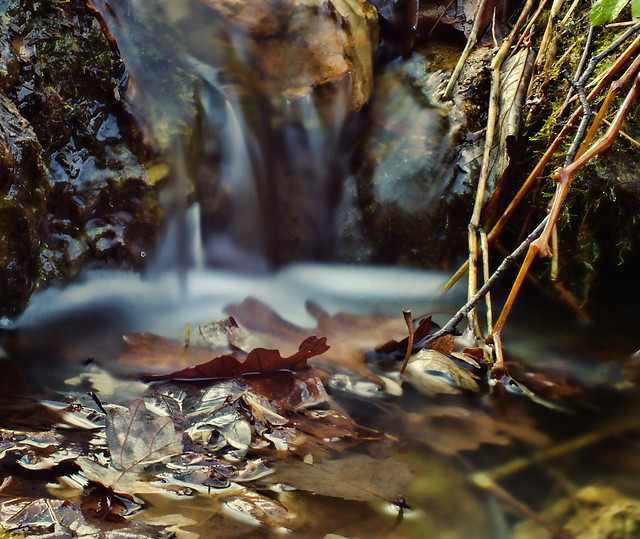
How about the manual controls? Well, I was in the valley and I used a 4X ND filter and set my shot up as follows. F11 at 10 seconds. My focus was the lone brown leaf in the very small water falls. I used a little Gorilla Pod and the timer to set off the camera.
I was more than pleased. This is not the best shot I could do with this camera, but I know I can do a nice 'dreamy' waterfall shot with it now given the right circumstances. This photo was not edited!
I spoke before about the macro feature, this is a great option with the flip up screen.
And lastly, the camera manages to pull off some decent sunrise and sunset photos on the 'sunset' preset no less!
I don't find myself leaving this camera around home anymore.
Yes, it has draw backs. It does do the best in terrible light conditions, but then what camera really does? For a hiker and hobbyist, it is a perfect choice.
NO, I am not normally a 'pink' person and neither is Morris, but his other collar was going to pieces and I had one of the hound pups old collars around. It fit, so he wore pink.
I think Morris can be manly in pink too!
I thought it would be fun to take a few self portraits, so I set up the tripod and set the timer to 12 seconds...ran...and tried my best. I actually liked the photos! AND yes I took off my glasses for these two.
Meanwhile I found a LOT of 'stuff' to 'shoot' with the cameras. It was a pleasant afternoon and boy howdy did I deserve some time in the woods.
I headed down into the woods to check out what the frost had killed off.
The leaves made for interesting patterns.
As the light began to fade, we headed back home ...
to our delight there was a gorgeous sunset.
Looking for more reasons to get out in the 'brown' woods and find some interesting things to take photos of...that is, other than me!
I collected a photo of the clouds from earlier in the summer...layered that over...
a photo of leaves that I'd shot just last week... I monkeyed around with opacity of the layers... and added some 'noise' in the form of grain [Elements filters] and came up with this.
Next I took a prospective shot that I'd like to try a bit of my own layering on.
Original:
Surely these do NOT look like a combination should do anything. But I decided to try anyway.
What I ended up with was something a bit warmer and nicer than the original shot and if you look closely you can see some texture. I did use a layer mask to bring out the bright red of the leaves on the lower right and the true color of the berries. I think it is nice and subtle.
Final:
I've become a fan of mixing different plug ins and experimenting with not only those plug ins...of which Topaz is my favorite, but of also blending textures over the photos.
Here is the original photo:
Here I used the original and copied it.
Next I used Topaz Adjust to my own liking.
I copied that layer and made a layer with Topaz Detail.
Lastly I copied the Detail Layer and use Topaz Simplify.
I experimented with the opacity on each layer trying to find a good fit.
So then I entered layer masks...
I liked how the image was shaping up. I took the Simplify layer and ran it through Topaz Clean.
However, I did not like how that came out. So I hit the undo button and stuck with the Simplify layer, which I then masked much like the layer shows in the above sample.
[I change my mind and experiment A LOT when working with photos.] If I don't copy down what I have done, I don't usually recall my work flow at all.
This final image was with the Simplified Layer on top, I used a mask to erase out the portions that I did not want yet to keep the bright colors and the playground equipment nice and clean looking. This was the focal point of my image.
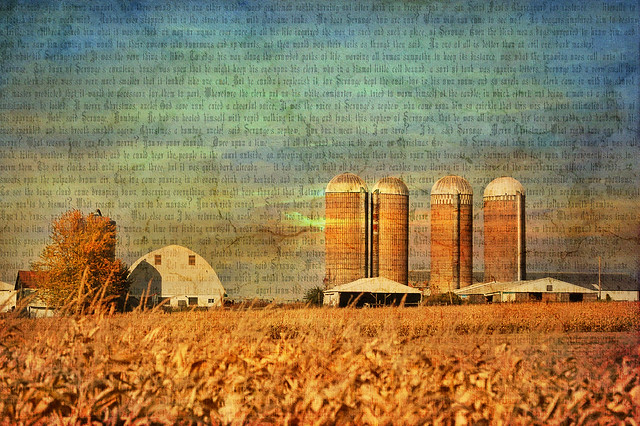
For fun here are a few images that I've used Textures on. I'll be doing a blog on that very soon, as I am trying to figure out how to make great textures myself to use on photos.
And...
Sometimes I just can't help myself. It may be a dreary day outside and I am stuck inside. So my creative juices start flowing and I think of odd and different experiments to do with photos I have taken.
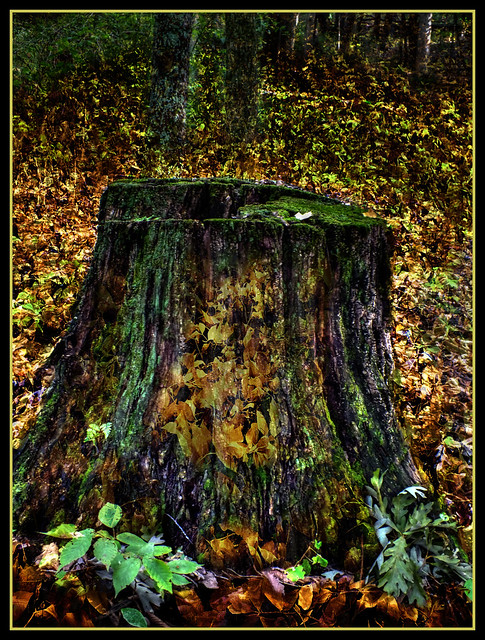
Here is an original shot:
So I took it into Photoshop 7.0 and used Topaz ReMask to cut out the stump...
I next added a layer of yellow leaves...
Now I have the original as the backround layer, the stump in its own layer that is cut out and I added the yellow leaves.
I tried varies things like changing the opacity of the yellow leaves just to see the effect. Well, that didn't work well, so I decided to try something different.
I added the leaves in two layers. Then used layer masks and the wonderful editing brush to leave in what I wanted and edit out what I didn't. This effect allowed me to show both the summer season in the forest and the fall season. It was a fun experiment.
The Forest remembers. Each season has its own time of passing. Summer to Autumn, the change to Winter and then the gradual coming again of Spring.
Each season has something to offer. Right now we are in the last hearty gasps of the colorful Fall Season, just before the world turns 'brown'. We call that the brown season. The days grow very short and the nights get longer and colder.
Color seems to drop out of the picture. Everything seems drab. But if you wander around the Forest long enough you will find remnants of both fall color and spring splendor.
Soon the snow will come and give you a whole new landscape to explore. I'm going to see what I can find that it beautiful and interesting during the 'brown' season. I have yet to pay much attention to this drab portion of late October through late November with a camera lens.
Perhaps it would be a good study for subjects in black and white or sepia?
I'll let the Forest be my guide, for the Forest ...the trees, the rocks, and the hills...they have been here much longer than I have!